
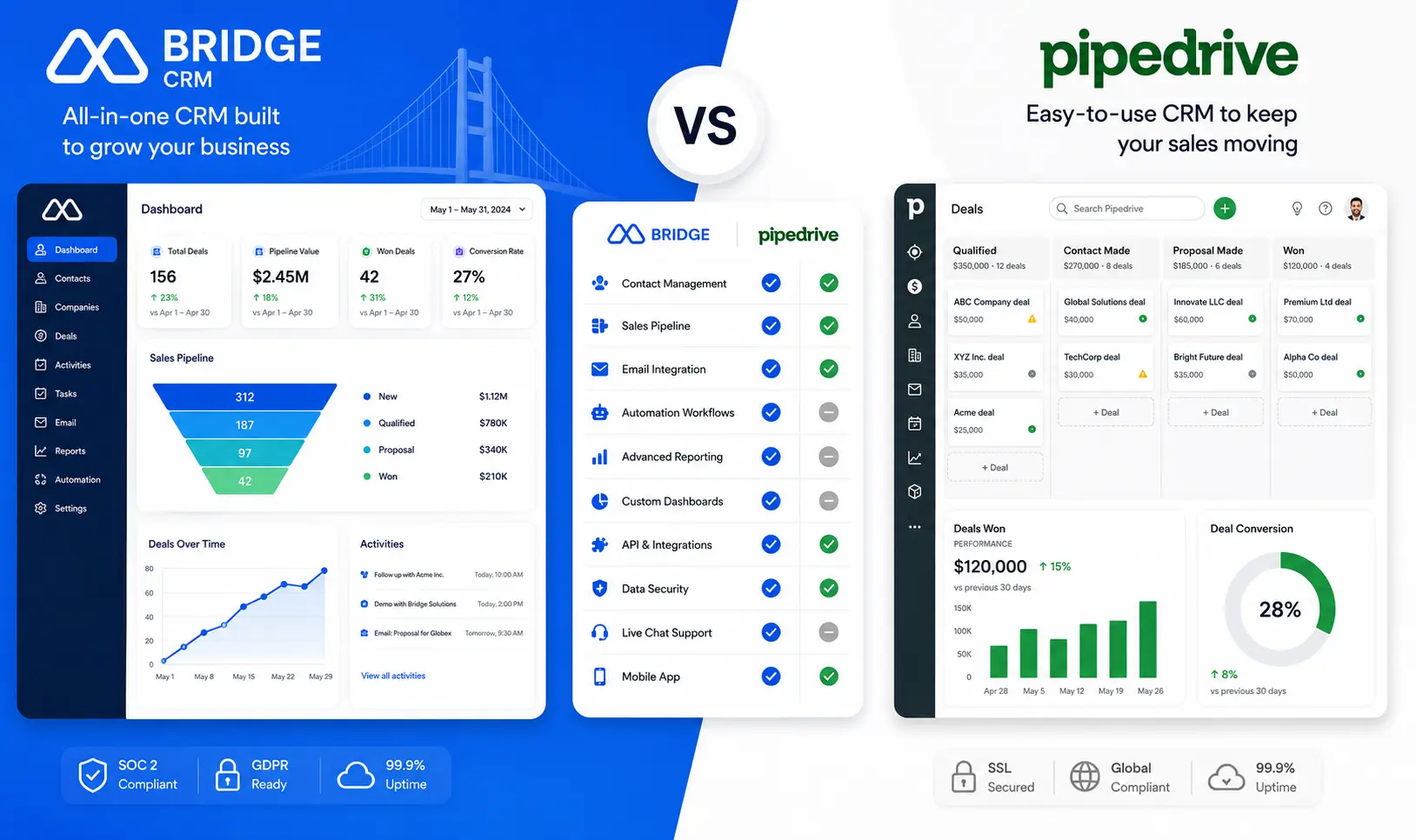
If you are currently weighing Bridge CRM vs Pipedrive, you are probably asking a version of the same question: which one will actually help my business grow and not just manage contacts?
Pipedrive has been a reliable sales pipeline tool for over a decade. It is clean, visual, and genuinely easy to use. But it was built for inside sales teams that live and die by the pipeline view. Bridge CRM was built for something different. It is made for manufacturers, distributors, and field-driven businesses that need sales, field operations, dealer management, and after-sales service to work as one connected system, powered by AI.
This comparison gives you an honest, side-by-side look at both so you can make the right call for your business in 2026.
Bridge CRM vs Pipedrive: Quick Overview
| Feature | Bridge CRM | Pipedrive |
|---|---|---|
| Best for | Manufacturing, distribution, field-driven SMBs | Inside sales teams and sales-led startups |
| Core strength | End-to-end CRM with field ops, dealer management, and AI | Visual pipeline management and deal tracking |
| AI capability | Milo, a native AI agent for automation and insights | An AI assistant is available on higher-tier plans |
| Field force management | Yes, via the Bridge FieldOps module | No |
| Dealer/distributor management | Yes, via Bridge Partner X | No |
| After-sales / service | Yes, via Bridge Serve | No |
| ERP integration | SAP, Tally, Oracle, Microsoft Dynamics | Limited, via third-party connectors |
| Offline mobile app | Yes | Limited |
| Free trial | Yes, contact Bridge for access | 14 days |
| Pricing model | Modular, pay for what your business needs | Per user per month, starting at $14/user |
Where Bridge CRM Wins
Bridge CRM was not built to compete with Pipedrive on pipeline visualization. It was built to solve a problem Pipedrive simply cannot: what happens when your sales team, field team, dealer network, and service teams all need to operate as one business and not as four separate departments?
Here is what Bridge brings to that problem:
Bridge Sales handles the core CRM, including leads, pipeline, quotations, orders, and customer records. It works the way you would expect a modern CRM to work, but it is designed for B2B sales cycles in manufacturing and distribution, not SaaS subscription sales.
Bridge FieldOps gives field reps a mobile-first app for geo-tagged visits, beat planning, offline order capture, and real-time reporting. Pipedrive has no equivalent. If your business has people on the ground visiting dealers, distributors, or industrial customers, this is not a nice-to-have. It is the core of how your sales actually happen.
Bridge Partner X manages your dealer and distributor network, covering onboarding, target setting, scheme visibility, credit limits, and order placement through a self-service dealer portal. Pipedrive has no concept of channel partners at all.
Bridge Serve covers after-sales service, including AMC contracts, warranty management, service tickets, and SLA tracking. For manufacturing and product companies, the relationship does not end with the sale. Bridge treats service as part of the customer relationship. Pipedrive does not.
Bridge Analytics gives leadership a single live dashboard covering sales pipeline health, field rep coverage, dealer performance, and service ticket status, all without building reports manually.
And then there is Milo, Bridge’s built-in AI agent. Milo learns your sales patterns and automates follow-ups, flags at-risk deals, suggests next actions, and surfaces insights that would otherwise need a data analyst. This is not a bolt-on AI feature unlocked at a premium tier. It is part of how Bridge works by default.
Where Pipedrive Wins
Pipedrive’s reputation is well-earned. If your entire sales motion happens in an office, your team communicates over email, and your main challenge is tracking deals through the pipeline, Pipedrive is one of the cleanest tools for that job.
Its drag-and-drop pipeline view is genuinely intuitive. New reps can get productive in days without much training. The integration library covers over 500 tools, which matters for businesses already deep in a tech stack. For a small sales team chasing outbound leads, it gets the job done without overcomplicating things.
Pipedrive’s 2026 plans start at $14 per user per month for the Essential tier, with Growth and Premium plans priced significantly higher. Many features, like email marketing, are priced as paid add-ons on top of that. For a team that only needs pipeline management, it is a reasonable spend. For a business that needs field ops, dealer management, and service alongside the CRM, the costs and the gaps start adding up fast.
Feature-by-Feature Comparison with Bridge CRM
| Feature | Bridge CRM | Pipedrive |
|---|---|---|
| Sales pipeline management | Yes | Yes, best-in-class |
| Lead and contact management | Yes | Yes |
| Email integration | Yes | Yes |
| Workflow automation | Yes, powered by Milo | Yes, from Growth plan |
| Field force management | Yes, via Bridge FieldOps | No |
| Beat planning and route management | Yes | No |
| Offline mobile functionality | Yes | Limited |
| Dealer/distributor portal | Yes, via Bridge Partner X | No |
| Service and warranty management | Yes, via Bridge Serve | No |
| Customer self-service app | Yes, via Bridge CX | No |
| Delivery and logistics tracking | Yes, via Bridge Drive | No |
| Lead capture from events and campaigns | Yes, via Bridge Nexus | Limited |
| ERP integration (SAP, Tally, Oracle) | Native | Via third-party |
| Real-time analytics dashboard | Yes, via Bridge Analytics | Basic reporting |
| AI-native automation | Yes, via Milo | AI assistant on premium plans |
| Modular pricing | Yes | No, per user across all plans |
Pricing: What You Actually Pay
Pipedrive’s pricing is transparent and per-user. The Essential plan starts at $14 per user per month on annual billing. Most growing teams end up on the Advanced or Professional plans, sitting at $34 to $49 per user per month, before add-ons like email campaigns are charged separately.
Bridge CRM works on a modular pricing model. You pay for the modules your business actually uses, whether that is Bridge Sales, Bridge FieldOps, Bridge Partner X, or others. This means a manufacturing company with a 20-person field team and a 5-person sales team is not paying per-head pricing for modules that half the team will never open.
For an honest pricing comparison specific to your team size and industry, request a Bridge CRM pricing
Which One Should You Choose?
- Your business involves field reps, distributors, dealers, or service engineers
- You need sales, field ops, and after-sales service to work together in one system
- You want AI that works natively inside your CRM and not bolted on at a premium tier
- You operate in manufacturing, distribution, FMCG, automobile, pharma, or any product-driven industry
- You need deep integration with SAP, Tally, Oracle, or any other software you use.
The honest take: if your sales team sits in an office making calls and chasing pipeline, Pipedrive is a very good tool. If your business has physical operations, and most Indian SMBs in manufacturing and distribution do, Bridge CRM is built for exactly what you are running.
CRM
The Bridge CRM vs Pipedrive comparison shows that both platforms solve different business needs. It was built for a specific type of business, one where all the sales activity happens in front of a laptop, tracked through a pipeline, and closed over email.
If that is your business, Pipedrive works well.
If your business has field reps visiting customers, dealers who need a portal, service engineers handling warranties, and a management team that needs to see all of it in one place, Bridge CRM is not just a better option. It is the only option on this list that was actually designed for what you are doing.
Ready to see Bridge CRM in action? Start your free trial or book a demo.



0 Comments